Healthcare information exchange is inherently complex. Connecting diverse data formats and systems can quickly become overwhelming. IguanaX simplifies this process by combining pre-built integration components with the ability to fully customize all aspects of the workflow.
Looking to send data to Epic? Wanting to upload files across SFTP servers? Monitoring live device output? Following HIE reporting requirements? You can do all of this and more with IguanaX!
Below, we’ll walk through how quickly you can build an interface and see your workflow in action.
How to Build an HL7 Interface in Minutes
In the above video, we demonstrate how to build a simple HL7-to-HL7 interface. IguanaX stands out by enabling rapid configuration with pre-built modules, while still allowing deep customization when needed.
Build Healthcare Interfaces Faster with Pre-Built Components
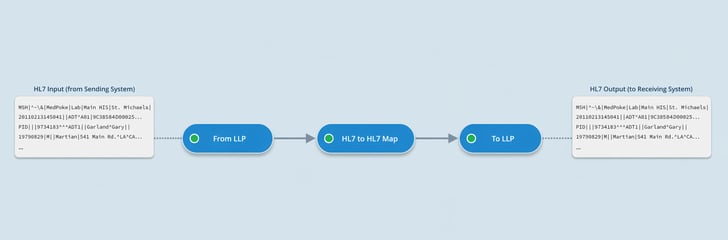
In this example, we use existing components to create a workflow that:
-
Receives HL7 messages via LLP
-
Applies transformations and filtering
-
Sends the results to a destination system
The LLP input and output modules are configurable out of the box, making it straightforward to define hosts, ports, and other connection details.
Between them, we use an HL7 to HL7 Mapping component to transform and filter incoming messages before passing them downstream.
This streamlined workflow demonstrates how quickly a functional interface can be built. In practice, integrations are often more complex and require tailored logic. IguanaX supports this by allowing you to configure existing components, build your own from scratch, or anything in-between.
Customize Workflows to Fit Your Integration Needs
IguanaX is designed with modularity in mind, making it simple to reuse logic, reorganize workflows, and extend functionality as needed.
To visualize the possibilities: imagine you not only want to send the resulting HL7 messages out via LLP, but also store certain values from the messages in a database. You can easily add another downstream module connected to the mapping step, allowing it to process the same filtered messages and handle database writes independently.
This separation of concerns gives you the flexibility to design workflows that scale with your needs—without sacrificing clarity or maintainability.
IguanaX’s code-based environment takes customization even further. If a pre-built component doesn’t fit your use case, you can extend existing ones or build entirely new modules from scratch. This gives you the freedom to design workflows tailored exactly to your requirements.
Want to try it yourself? Get started with IguanaX today.